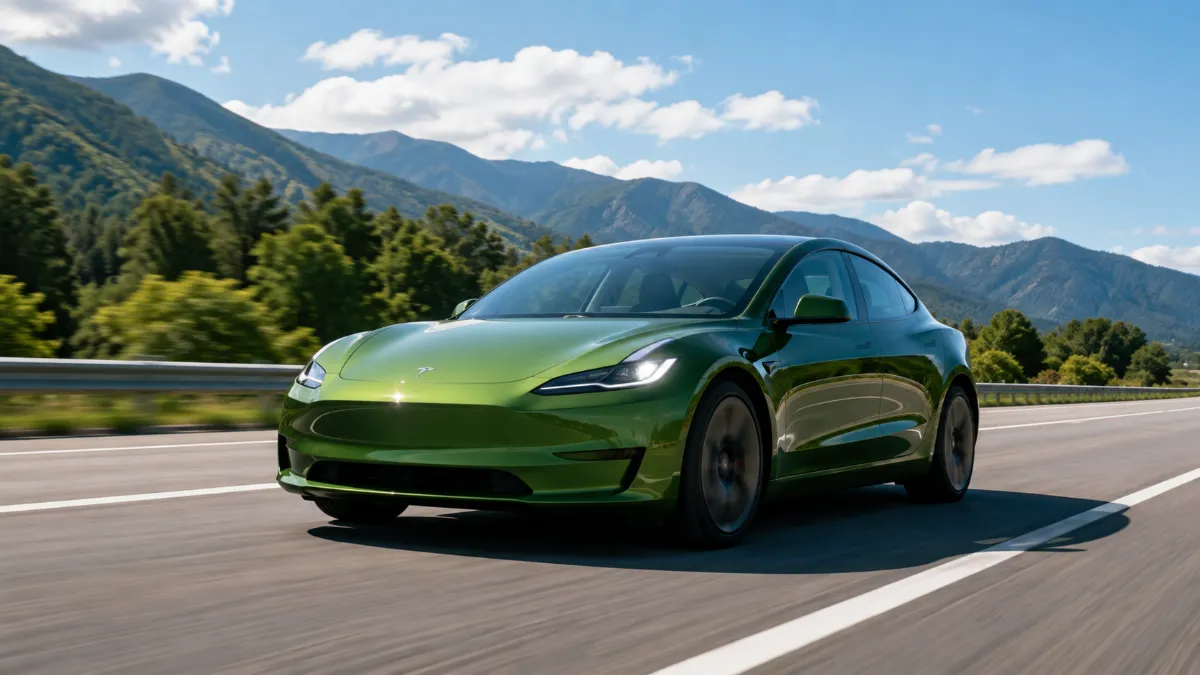
Buying a Tesla can feel a little different from buying a traditional car. There is no conventional engine, many controls are built around the touchscreen, and features such as Traffic-Aware Cruise Control, Autosteer and Full Self-Driving (Supervised) can change the way you drive.
For a new owner, however, one thing is important to understand from the beginning: Tesla Autopilot is a driver-assistance system, not a system that turns your car into a fully autonomous vehicle. Tesla says drivers must remain attentive and ready to take control whenever necessary.
This guide explains Tesla Autopilot in simple language, including how to set it up, how the controls work, what the major features do, and the safety habits every new Tesla owner should follow.
What Is Tesla Autopilot?
Tesla Autopilot is a collection of advanced driver-assistance features designed to reduce the workload involved in everyday driving.
The basic Autopilot package includes two important functions:
- Traffic-Aware Cruise Control (TACC): Adjusts your vehicle’s speed according to the traffic ahead and maintains a selected following distance.
- Autosteer: Helps steer the vehicle within a clearly marked lane while working with Traffic-Aware Cruise Control.
Depending on the Tesla model, software version, hardware and market, owners may also have access to additional features such as Autopark, Auto Lane Change, Summon and Full Self-Driving (Supervised). Feature availability can vary considerably between vehicles.
That is why two Tesla vehicles that look almost identical may not necessarily have exactly the same driving-assistance features.
Autopilot vs. Full Self-Driving (Supervised)
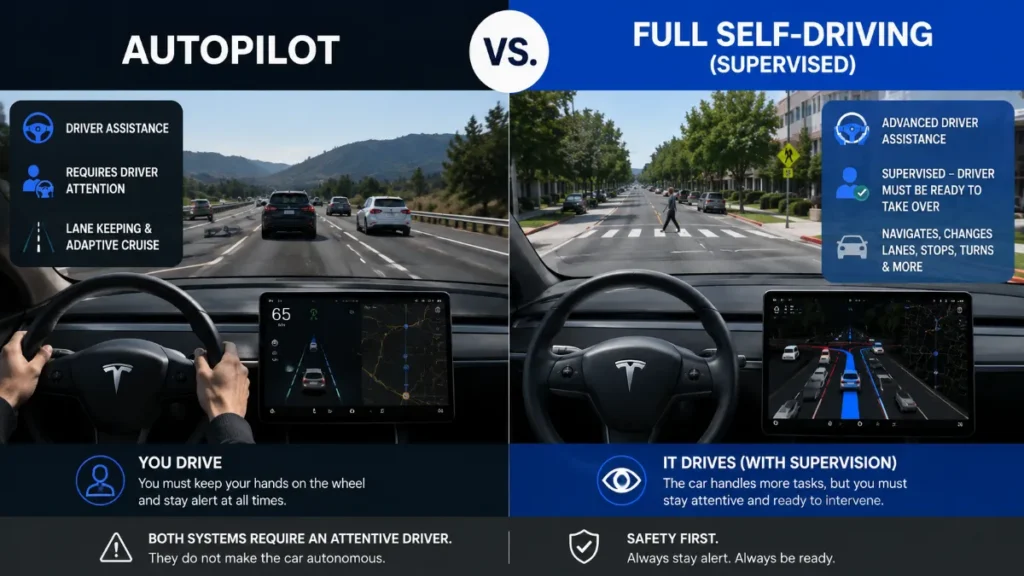
This is probably the biggest point new Tesla owners should understand.
Autopilot does not mean the car can drive itself without supervision.
Tesla’s current Full Self-Driving (Supervised) system can perform more driving tasks than basic Autopilot, including making turns, navigating intersections, changing lanes and following a navigation route. However, Tesla explicitly states that these capabilities do not make the vehicle autonomous and require active driver supervision.
In simple terms:
Autopilot = assistance while you drive.
FSD (Supervised) = more advanced assistance, but you are still responsible for the vehicle.
Think of these systems as an extra set of driving capabilities rather than a replacement for the person behind the wheel.
How to Set Up Tesla Autopilot
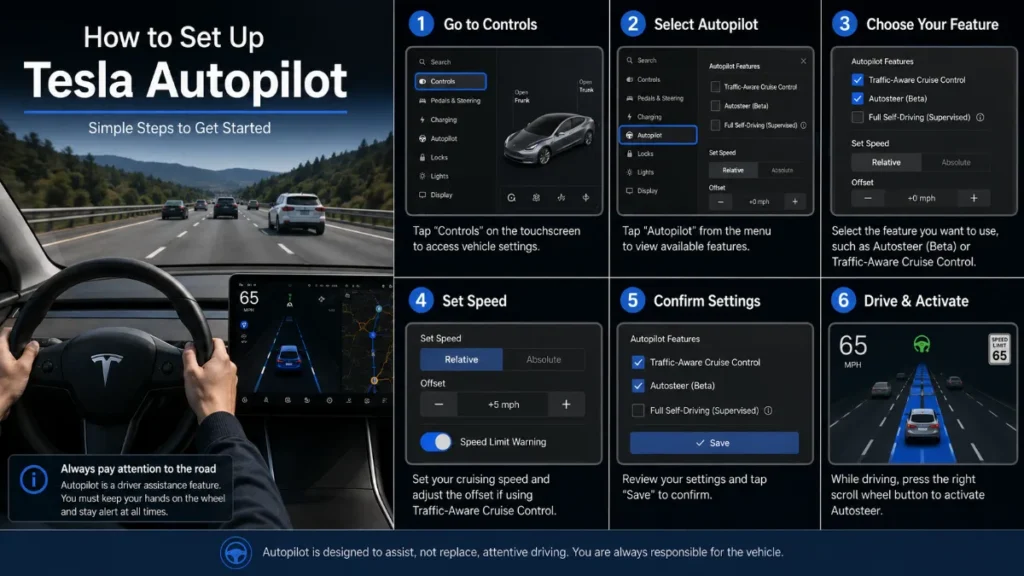
Before using Autopilot for the first time, take some time to become familiar with your Tesla’s controls.
1. Update the Vehicle
Tesla regularly delivers software updates that can improve existing functions and introduce new features. Your available features can therefore change as the vehicle receives updates.
Check:
Controls → Software
You can also see vehicle software information from the Tesla mobile app.
2. Check Your Available Features
Open the vehicle’s software and Autopilot-related menus to see which features are actually available on your car.
Do not assume that every Tesla has every Autopilot or FSD feature.
Hardware, model, trim, software version and region can all affect availability.
3. Read the Owner’s Manual
Tesla’s built-in Owner’s Manual is particularly useful because it is tailored to the vehicle configuration and software version.
On supported vehicles, Tesla directs owners to:
Controls → Service → Owner’s Manual
The manual can contain information that is specific to your vehicle.
How Traffic-Aware Cruise Control Works
Traffic-Aware Cruise Control is one of the easiest Autopilot features to understand.
Instead of simply maintaining a fixed speed like traditional cruise control, TACC can adjust your speed based on the vehicle ahead.
For example, suppose you set the cruise speed to 100 km/h.
If traffic ahead is moving at 80 km/h, the Tesla can slow down and maintain an adjustable following distance. When the road clears, it can accelerate toward the selected cruising speed, subject to system limitations.
Why New Owners Like It
TACC can be particularly useful on:
- Highways
- Long open roads
- Stop-and-go traffic
- Roads with relatively predictable traffic flow
But remember that the system does not eliminate the need to watch the road.
How Autosteer Works
Autosteer takes things a step further by helping with steering.
When the system is available and engaged, it can assist the vehicle in staying within its lane while Traffic-Aware Cruise Control manages speed.
On some newer Tesla configurations, the right steering-wheel scroll button is used to activate Autosteer. Vehicles with different controls or configurations may use different activation methods, so always check your vehicle’s manual first.
When Autosteer is active, the vehicle will provide indications on the screen and may issue alerts if it needs your attention.
What Autosteer Does Not Mean
Autosteer does not mean you can:
- Take a nap
- Use your phone
- Stop watching traffic
- Leave the driver’s seat
- Treat the car as completely autonomous
Tesla’s owner information specifically says that drivers must monitor the road, surroundings and other road users and be prepared to take over immediately.
7 Tesla Autopilot Features New Owners Should Know
1. Traffic-Aware Cruise Control
TACC automatically manages speed and following distance based on traffic ahead.
It is one of the most practical features for highway driving because you don’t have to constantly adjust the accelerator and brake yourself.
2. Autosteer
Autosteer assists with steering while keeping the vehicle within suitable lane markings.
When combined with TACC, it can make highway driving considerably less tiring.
However, the driver remains responsible for monitoring the road and taking control when required.
3. Auto Lane Change
On vehicles and software configurations where it is available, Auto Lane Change can assist with moving into an adjacent lane.
Tesla’s documentation describes it as a feature that can assist with lane changes when the appropriate conditions and controls are met.

Even when the car performs the maneuver, the driver should check the surrounding traffic and remain ready to intervene.
4. Autopark
Autopark is designed to help with parallel and perpendicular parking.
For a new Tesla owner, this can be one of the most impressive features because the vehicle can handle much of the steering required during a parking maneuver.
Availability and operation vary by vehicle and software version.
5. Summon
Summon-related features can help move a Tesla in or out of tight parking spaces.
Tesla currently describes Dumb Summon as moving the vehicle in and out of a tight space, while Actually Smart Summon can navigate more complex parking environments on supported vehicles.
These features should be used carefully because parking lots can contain pedestrians, shopping carts, vehicles and other unexpected obstacles.
6. Full Self-Driving (Supervised)
FSD (Supervised) is Tesla’s more advanced driver-assistance package.
According to Tesla, it can handle a wider range of situations, including navigating city streets, making turns, negotiating intersections, following navigation routes and changing lanes.
But the word “Supervised” matters.
The system still requires an attentive driver who can take over at any time.
Tesla also notes that available FSD features can vary according to vehicle configuration, hardware, software version, model, trim and region.
7. Over-the-Air Improvements
One of the biggest differences between a Tesla and many traditional cars is the way software can be updated remotely.
Tesla regularly provides over-the-air software updates. These updates can introduce new functions or modify existing features.
This means your Tesla’s driving experience can evolve over time without requiring a traditional visit to a dealership for every software improvement.
Tesla Autopilot Controls: A Quick Guide
The exact controls depend on your Tesla model and model year, but the general experience is straightforward.
To Adjust Speed
The steering-wheel scroll controls can be used to adjust the selected speed on supported vehicles.
To Cancel Assistance
Depending on the vehicle, pressing the brake, using the appropriate steering-wheel control or another designated control can disengage the system.
To Take Over
If you feel uncomfortable with what the vehicle is doing, take control immediately.
There is no reason to wait for the system to correct itself.
Tesla’s documentation explains that driver intervention is expected when necessary.
Tesla Autopilot Safety Tips for New Owners
Keep Your Attention on the Road
This is the most important rule.
Even if the Tesla is steering, accelerating and braking, you are still the driver.
Tesla’s current documentation requires driver attentiveness while Autopilot features are engaged.
Keep Your Hands Available to Take Control
Do not position yourself in a way that makes emergency intervention difficult.
The vehicle can encounter situations that the system does not handle as expected.
Never Use Your Phone While Driving
Autopilot should never be treated as permission to use a smartphone, watch videos or become distracted.
Watch Lane Markings
Autosteer works within its operating limitations. Poor lane markings, construction zones, unusual road layouts and changing road conditions can affect the system.
Expect Unexpected Behavior
A driver should always be prepared for sudden braking, a lane change request, a system disengagement or another situation requiring manual control.
Do Not Assume FSD Means Autonomous Driving
This deserves repeating.
Full Self-Driving (Supervised) is not fully autonomous driving. Tesla itself states that current enabled features require active driver supervision.
What Happens If You Ignore Attention Warnings?
Tesla vehicles can issue visual and audible warnings when the system detects that the driver is not paying sufficient attention.
On supported vehicles, repeatedly ignoring these warnings can result in Autopilot restrictions or suspension for the remainder of a drive. Tesla’s current Model Y documentation, for example, describes escalating warnings and a strikeout system for repeated inattentiveness.
This is another reason not to experiment with ways of defeating the driver’s monitoring system.
The safest approach is simple: stay engaged and drive the car.
Is Tesla Autopilot Worth Using?
For many drivers, yes—but the value comes from using it correctly.
On a long highway journey, Traffic-Aware Cruise Control and Autosteer can reduce the amount of constant steering, accelerating and braking you need to perform.
For parking, Autopark can be convenient.
For owners with access to FSD (Supervised), the system can provide a much broader range of assisted-driving functions.
But none of these features removes the driver’s responsibility.
The best way to think about Tesla Autopilot is as technology that assists you, not technology that replaces you.
Common Tesla Autopilot Mistakes New Owners Make
Mistake 1: Assuming the Car Is Fully Autonomous
This is the biggest mistake. The vehicle still needs an attentive driver.
Mistake 2: Not Reading the Manual
Tesla controls and features can differ between models and software versions.
Mistake 3: Testing the System in Difficult Conditions
New owners should first become comfortable with the system in familiar, predictable driving environments.

Mistake 4: Ignoring Warnings
Warnings are there for a reason. If the car asks you to take control, take control.
Mistake 5: Assuming Every Tesla Has the Same Features
A Model 3 from one model year may not have exactly the same capabilities as a Model Y, Model S or Model X with different hardware and software.
Tesla Autopilot vs Traditional Cruise Control
Traditional cruise control generally maintains a selected speed.
Tesla’s Traffic-Aware Cruise Control can adjust speed based on traffic ahead, while Autosteer can also assist with steering.
That combination is what makes the Tesla experience feel noticeably different from a conventional car.
The bigger difference becomes even more apparent with advanced features such as Auto Lane Change, Autopark and FSD (Supervised).
Still, the underlying principle remains the same:
The technology assists the driver; the driver remains responsible.
Frequently Asked Questions
Is Tesla Autopilot fully self-driving?
No. Tesla states that its currently enabled Autopilot and FSD (Supervised) features do not make the vehicle autonomous. Drivers must remain attentive and ready to take control.
Can I use Autopilot on the highway?
Autopilot features can be useful on suitable roads, subject to the system’s operating conditions and limitations. Always monitor the road and be prepared to take over.
Does Autopilot steer the car?
Autosteer can assist with steering within its operating conditions. Traffic-Aware Cruise Control works alongside it to manage speed.
Can Tesla Autopilot change lanes?
Some Tesla configurations support Auto Lane Change, while more advanced FSD (Supervised) capabilities can perform lane changes under supervision. Availability depends on the vehicle and region.
Does every Tesla have Full Self-Driving?
No. Feature availability depends on the vehicle, configuration, software, hardware and region.
Can I sleep while Tesla Autopilot is driving?
Absolutely not. Autopilot and FSD (Supervised) require an attentive driver who can take over when necessary.
How do I learn which features my Tesla has?
Check the vehicle’s touchscreen under the relevant software and Self-Driving/Autopilot menus, and consult the Owner’s Manual for your specific vehicle. Tesla recommends using the vehicle’s built-in manual for configuration-specific information.
Final Verdict
Tesla Autopilot can make everyday driving easier, but it should never be confused with a replacement for the driver.
For a new Tesla owner, the smartest approach is to learn the basics first: understand Traffic-Aware Cruise Control, become comfortable with Autosteer, learn how to disengage the system quickly, and understand exactly which features your particular Tesla supports.
Once you understand the technology and its limitations, features such as Autosteer, Auto Lane Change, Autopark and FSD (Supervised) can make the Tesla driving experience feel very different from a traditional car.
The key is simple: use the technology as an assistant, stay alert, and always be ready to drive yourself.
Feature names, availability and operation can change with Tesla software updates and can vary by model, hardware, software version and market. Always check the Owner’s Manual displayed for your specific Tesla before using an assisted-driving feature.