Tesla Autopilot is one of the best-known driver-assistance systems in the automotive world. It can make highway driving less tiring by helping with steering, acceleration and braking. But despite the technology’s advanced capabilities, Autopilot is not a fully autonomous driving system.
That distinction is important.
For Tesla owners, the safest approach is to understand exactly what the system is designed to do, where its limitations appear, and what the driver still needs to handle. In this guide, we explain Tesla Autopilot in simple language, including its capabilities, limitations, safety features and the responsibilities that remain with the person behind the wheel.
Important: Features and availability can vary by Tesla model, software version, market and vehicle configuration. Always follow the instructions and limitations shown in your Tesla owner’s manual and on-screen prompts.
Tesla Autopilot at a Glance
| Feature | What It Does |
|---|---|
| Traffic-Aware Cruise Control | Adjusts vehicle speed based on surrounding traffic |
| Autosteer | Helps keep the vehicle within its lane |
| Automatic Braking | Can assist with braking in certain situations |
| Lane Assistance | Helps monitor lane position |
| Driver Monitoring | Encourages the driver to remain attentive |
| Software Updates | Tesla can improve or modify features through updates |
| Full Autonomy | Not provided by standard Autopilot |
The exact features available depend on the vehicle and software configuration.
What Is Tesla Autopilot?
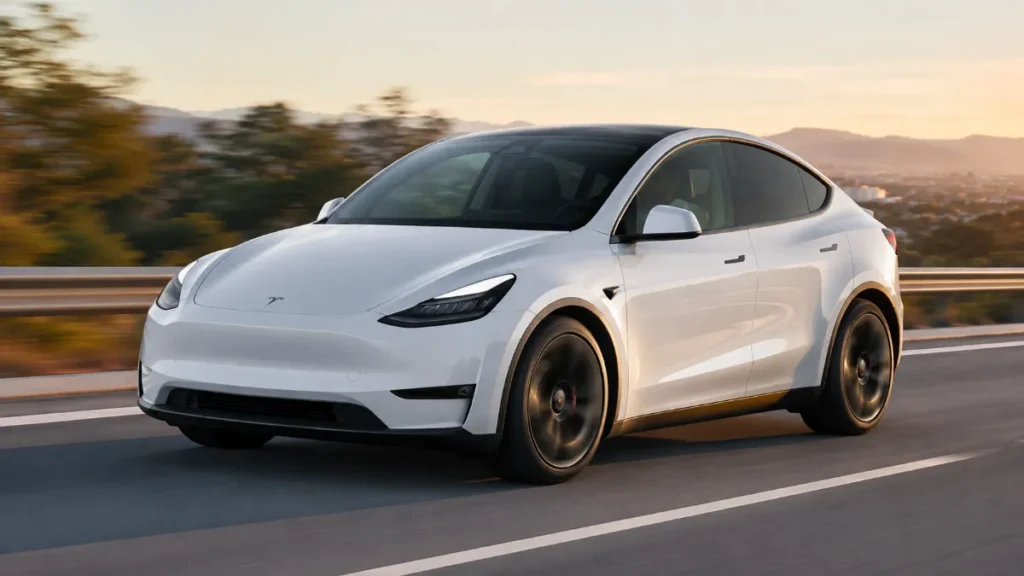
Tesla Autopilot is a collection of advanced driver-assistance features (ADAS) designed to reduce the amount of routine driving work required from the driver.
It uses information from the vehicle’s cameras and other onboard systems to understand the surrounding environment and assist with certain driving tasks.
The name “Autopilot” can sometimes create confusion. In aviation, autopilot also does not mean that the pilot simply walks away from the controls. The same basic idea applies here: Tesla’s system is designed to assist the driver, not replace the driver.
The person in the driver’s seat remains responsible for controlling the vehicle and responding to changing road conditions.
What Can Tesla Autopilot Do?
1. Traffic-Aware Cruise Control
One of the core functions is Traffic-Aware Cruise Control.
When conditions allow, the system can maintain a selected cruising speed while adjusting the vehicle’s speed according to traffic ahead.
For example, if another vehicle slows down in front of your Tesla, the system can reduce speed to maintain a suitable following distance.
When traffic clears, the vehicle can accelerate toward the selected speed.
However, drivers should never assume that the system will recognize every possible road hazard.
2. Autosteer Can Assist With Steering
Autosteer is designed to provide steering assistance and help keep the vehicle within its detected lane.
On suitable roads, this can make long drives less tiring.
The driver still needs to:
- Keep attention on the road
- Keep hands ready to take control
- Watch surrounding traffic
- Monitor lane markings
- Be prepared for unexpected situations
Autosteer should be viewed as steering assistance, rather than a replacement for human driving.
3. Automatic Braking Can Help in Certain Situations
Tesla vehicles include various collision-warning and braking-related safety systems.
Depending on the vehicle and circumstances, the car may warn the driver about a potential collision and can assist with braking.
These systems are designed to provide an additional layer of protection.
They are not a guarantee that every collision will be avoided.
A driver should never deliberately rely on emergency braking technology to compensate for distracted or unsafe driving.
What Tesla Autopilot Cannot Do
This is arguably the most important part of understanding Autopilot.
Autopilot does not mean:
- You can sleep while driving
- You can use your phone freely
- You can leave the driver’s seat
- You can stop watching traffic
- The vehicle understands every road situation
- The vehicle can guarantee accident prevention
- The car can drive safely in every weather condition
- The system can replace a licensed driver
The vehicle may perform impressive driving tasks, but there are still situations where human judgment is essential.
Why Driver Attention Matters
A common mistake is becoming too comfortable with driver-assistance technology.
When a vehicle handles steering and speed for an extended period, the driver may naturally become less engaged.
This can create a dangerous situation.
A road environment can change within seconds.
A vehicle may suddenly:
- Cut into your lane
- Stop unexpectedly
- Lose control
- Appear from a blind spot
- Encounter road construction
- Approach an unusual intersection
- Drive around a damaged road surface
- Encounter an object that the system does not interpret correctly
The driver must remain ready to intervene.
Autopilot and Bad Weather
Weather can significantly affect driving-assistance systems.
Heavy rain, snow, fog, dust or strong glare may make it more difficult for cameras and sensors to interpret the road environment.
Drivers should be especially cautious during:
- Heavy rain
- Fog
- Snowfall
- Poor visibility
- Strong sunlight
- Dirty or obstructed cameras
- Roads with unclear lane markings
If the system gives a warning or becomes unavailable, the driver should take over and continue driving manually.
Lane Markings Are Important
Autosteer depends heavily on its ability to understand the road and lane boundaries.
Road construction can make this more complicated.

Temporary markings, faded lines, unusual lane layouts and confusing intersections may create situations in which driver assistance does not behave as expected.
This is why drivers should never assume that the system will correctly interpret every road layout.
Keep Your Eyes on the Road
Driver attention is not optional when using Autopilot.
Even if the vehicle is maintaining the lane and following traffic, the driver needs to continuously monitor what is happening.
Good practice includes:
Look ahead: Watch the road rather than focusing on the center display.
Monitor traffic: Keep track of vehicles around you.
Stay prepared: Be ready to steer or brake immediately.
Follow alerts: Respond promptly when the vehicle requests driver attention.
Avoid distractions: Do not use Autopilot as permission to text, watch videos or perform other distracting activities.
What Happens When the System Requests Driver Attention?
Tesla vehicles can provide visual and audible alerts when driver interaction is required.
A driver should not ignore these warnings.
If the vehicle asks you to take control, take control immediately and safely.
Repeatedly ignoring alerts can lead to additional warnings or restrictions depending on the vehicle and software configuration.
Autopilot Does Not Make a Tesla Self-Driving
This is one of the biggest misconceptions surrounding Tesla.
Autopilot is a driver-assistance system.
The word “Autopilot” does not mean the car is capable of completely independent driving in every environment.
Even more advanced Tesla driving features should not be confused with a system that allows a driver to abandon responsibility for the vehicle.
The distinction between driver assistance and autonomous driving is extremely important from a safety perspective.
Autopilot vs Human Driver
| Situation | Autopilot | Driver |
|---|---|---|
| Maintain cruising speed | Can assist | Must supervise |
| Follow traffic | Can assist | Must monitor |
| Steering assistance | Can assist | Must remain ready |
| Identify every hazard | Not guaranteed | Must observe |
| Road judgment | Limited | Required |
| Unexpected situations | May require intervention | Responsible |
| Safe operation | Assists | Ultimately responsible |
The technology and driver should work together rather than one replacing the other.
Common Mistakes Tesla Drivers Should Avoid
Using a Phone While Autopilot Is Active
Autopilot does not make phone use safe.
Your attention can still be required within a fraction of a second.
Looking Away for Long Periods
Even a few seconds of distraction can matter when traveling at highway speeds.
Keep your attention on the road.
Assuming the Vehicle Will Stop for Everything
Automatic emergency braking and other safety systems have limitations.
Never treat them as an invisible safety net.
Using Autopilot Outside Suitable Conditions
If visibility is poor or the system indicates that assistance is unavailable, manual driving may be necessary.
Ignoring Warnings
Driver alerts are there for a reason.
If the vehicle asks you to intervene, do not delay.
How to Use Tesla Autopilot More Safely
A sensible approach is simple:
Before starting
Check that:
- Your windshield and cameras are clean
- You understand the active features
- You know how to disengage assistance
- You are familiar with the road
- You are physically and mentally prepared to drive
While driving
- Keep watching the road
- Monitor surrounding vehicles
- Keep your hands ready
- Follow speed limits and traffic laws
- Watch for changing road conditions
- Respond quickly to warnings
When conditions change
If you are uncomfortable with the system’s behavior, take control.
There is no advantage in continuing to use driver assistance when manual control is the safer option.
Does Tesla Autopilot Reduce Driver Work?
Yes, that is one of its main advantages.
Long highway journeys can become less tiring when the vehicle assists with speed control and steering.
But reducing workload is different from removing responsibility.

Think of Autopilot as an additional driving tool.
It can handle certain repetitive tasks, while the driver remains responsible for the overall driving situation.
Tesla Software Updates Can Change Features
Tesla vehicles receive software updates that can modify, improve or change the behavior of certain features.
This means that the exact Autopilot experience can change over time.
A feature available on one Tesla may also differ from another vehicle because of:
- Model
- Hardware
- Software version
- Region
- Vehicle configuration
- Regulatory requirements
For this reason, Tesla owners should check the latest vehicle documentation instead of relying entirely on older videos or social-media posts.
Is Tesla Autopilot Safe?
The answer depends heavily on how it is used.
Driver-assistance technology can provide useful support, but it cannot eliminate the need for an attentive driver.
The safest mindset is:
Autopilot is there to assist you—not to replace you.
When drivers understand the system’s capabilities and limitations, they can use the technology more responsibly.
Final Verdict
Tesla Autopilot represents an important step in the development of modern driver-assistance technology. Features such as adaptive cruise control and steering assistance can make everyday driving more comfortable and reduce fatigue on suitable roads.
But the technology has clear boundaries.
The driver remains responsible for the vehicle at all times.
Do not treat Autopilot as a license to become distracted, take your eyes off the road or stop paying attention. Road conditions can change unexpectedly, and the driver must always be prepared to take control.
For Tesla owners, the best way to use Autopilot is simple: understand what it can do, understand what it cannot do, stay alert and be ready to drive yourself whenever necessary.